> ## Documentation Index
> Fetch the complete documentation index at: https://fdm.furkankursav.com/llms.txt
> Use this file to discover all available pages before exploring further.
# Navigation
Flexible Directional Menu uses a directional, layer-based navigation model built around four primary input directions: **Up**, **Down**, **Left**, and **Right**.
The menu does not rely on cursor-based or radial angle selection. Instead, it interprets directional input as discrete navigation commands between logical selection nodes.
## Default Mode
When you input a direction, the system selects the first valid container in that direction.\
If there is no valid container in the given direction, the input is ignored.
If more than one valid container exists in that direction, the system selects the next available one.
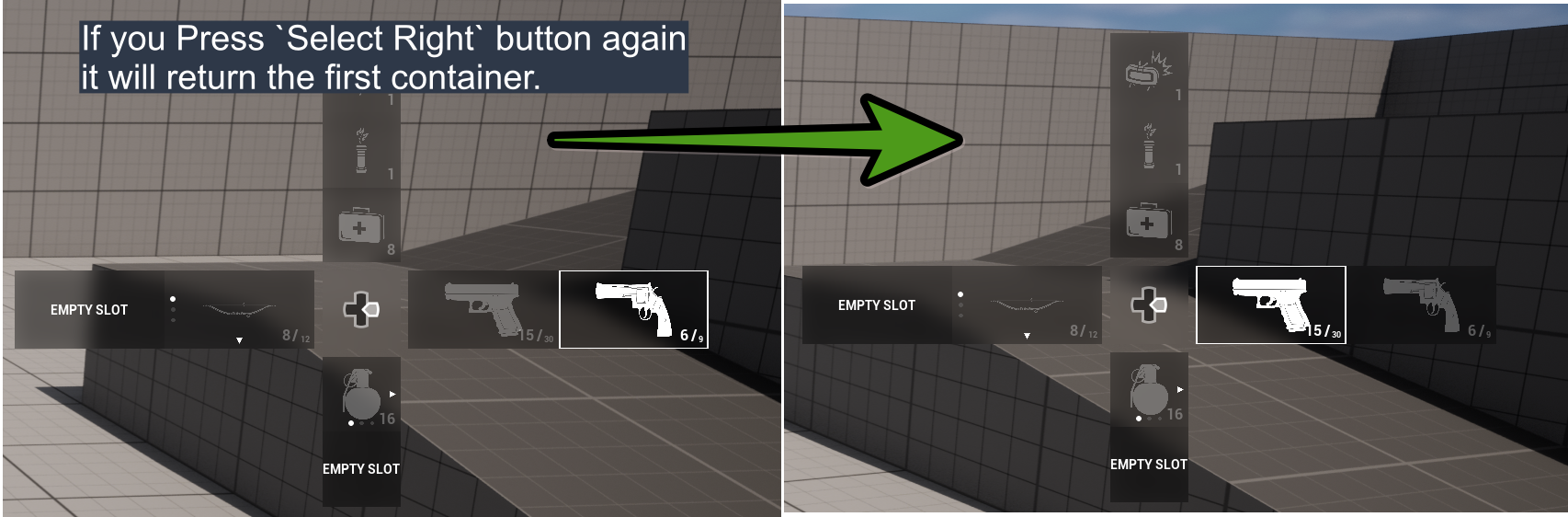
If **Cycled Container Changing** is enabled in the configuration file, and the last container in a direction is currently selected, providing the same directional input again will wrap around and select the first container in that direction.
 ## Nested Mode
When you hover over a container that contains multiple slots:
* The **Change Slot Widget** appears (this widget can be customized in the Config asset).
* The **Change Slot Mapping Context** is bound.
## Nested Mode
When you hover over a container that contains multiple slots:
* The **Change Slot Widget** appears (this widget can be customized in the Config asset).
* The **Change Slot Mapping Context** is bound.
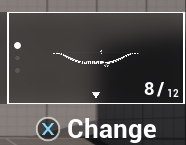 If you press and hold **IA\_FDM\_SwitchSlot** for at least the configured **Change Slot Hold Duration**, the container expands and its internal slots become visible. The system is now in **Nested Mode**.
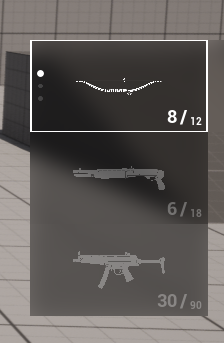 While Nested Mode is active:
* If you input the **same direction as the container’s primary direction**, or the **opposite direction**, you can navigate between the slots inside that container.
* Slot cycling behavior (wrapping from last to first) can be enabled via **Cycled Slot Changing** in the configuration.
* If you input a **perpendicular direction**, you can move to other containers (unless **Can Travel Other Containers in Nested Mode** is disabled in the configuration).
When you release **IA\_FDM\_SwitchSlot**:
* All expanded containers collapse.
* Nested Mode is deactivated.
* Slot selection events are fired for the currently selected slot.
## Debounce Mechanism
Applies a debounce delay before a container or entry is considered selected. This prevents rapid directional navigation from immediately committing selection changes while the user is still navigating.
For example, if you want to navigate to the third container in the up direction, without debounced selection the first and second containers would also be briefly marked as selected while the focus passes through them. Debounced selection solves this problem by requiring the focus to remain on an entry for a defined amount of time before it is committed as selected.
The entry must remain focused for the specified `Debounce Duration in Seconds` before it is marked as selected.
If **debounce turned off**, in an example like the one above, the following functions would be called in sequence:
1. Unselected for Pistol
2. Selected for Medkit
3. Unselected for Medkit
4. Selected for Pipe Bomb
5. Unselected for Pipe Bomb
6. Selected for Mine
but if debounce was enabled, instruction order would be:
1. Unselected for Pistol
2. Selected for Mine
You can change the buffer duration in the configuration asset.
While Nested Mode is active:
* If you input the **same direction as the container’s primary direction**, or the **opposite direction**, you can navigate between the slots inside that container.
* Slot cycling behavior (wrapping from last to first) can be enabled via **Cycled Slot Changing** in the configuration.
* If you input a **perpendicular direction**, you can move to other containers (unless **Can Travel Other Containers in Nested Mode** is disabled in the configuration).
When you release **IA\_FDM\_SwitchSlot**:
* All expanded containers collapse.
* Nested Mode is deactivated.
* Slot selection events are fired for the currently selected slot.
## Debounce Mechanism
Applies a debounce delay before a container or entry is considered selected. This prevents rapid directional navigation from immediately committing selection changes while the user is still navigating.
For example, if you want to navigate to the third container in the up direction, without debounced selection the first and second containers would also be briefly marked as selected while the focus passes through them. Debounced selection solves this problem by requiring the focus to remain on an entry for a defined amount of time before it is committed as selected.
The entry must remain focused for the specified `Debounce Duration in Seconds` before it is marked as selected.
If **debounce turned off**, in an example like the one above, the following functions would be called in sequence:
1. Unselected for Pistol
2. Selected for Medkit
3. Unselected for Medkit
4. Selected for Pipe Bomb
5. Unselected for Pipe Bomb
6. Selected for Mine
but if debounce was enabled, instruction order would be:
1. Unselected for Pistol
2. Selected for Mine
You can change the buffer duration in the configuration asset.
 The following table describes the different states an entry can be in during navigation and selection.
| State | Description |
| -------- | ------------------------------------------------------------------------------------------------------------------------------- |
| Focused | Visually focused on the UI, but not yet confirmed as selected. (Only `On Entry Focused` event is triggered.) |
| Pending | Waiting for debounce duration before committing selection. |
| Selected | Confirmed as the active selection. (`On Entry Changed` event is triggered and `On Entry Selected` interface function is called) |
The following table describes the different states an entry can be in during navigation and selection.
| State | Description |
| -------- | ------------------------------------------------------------------------------------------------------------------------------- |
| Focused | Visually focused on the UI, but not yet confirmed as selected. (Only `On Entry Focused` event is triggered.) |
| Pending | Waiting for debounce duration before committing selection. |
| Selected | Confirmed as the active selection. (`On Entry Changed` event is triggered and `On Entry Selected` interface function is called) |